Step 1: Go to Settings
Open the Settings menu from your dashboard.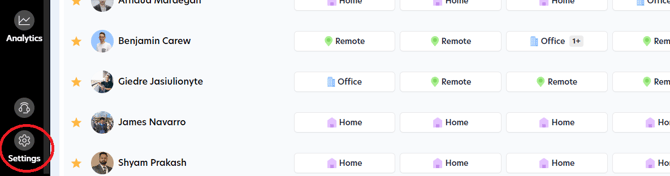
Step 2: Select Building
Click on Building to see a list of all your buildings.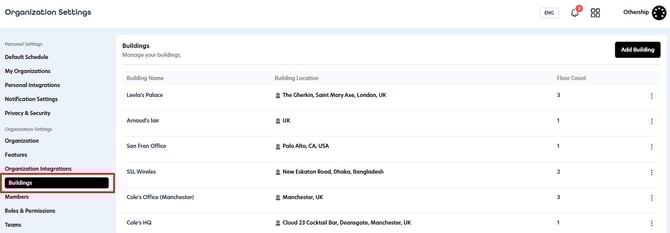
Step 3: Edit Building
Click on the  button for the building you want to update and select Edit Building.:;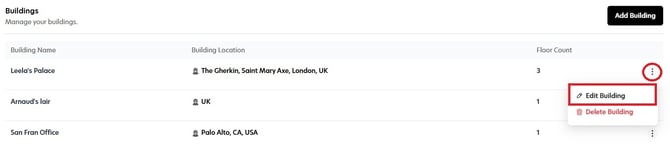
Step 4: Configure Policies
Scroll down to the Parking Policies section to review and customize your building’s parking settings. You can activate a policy by toggling it on and specify the preferred times to suit your requirements.
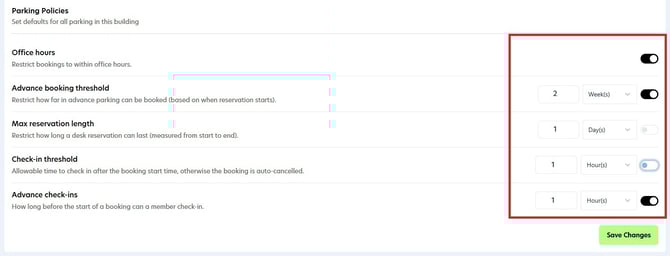
Please note the following:
- If Advance Check-Ins is turned off, users can check in any time before their scheduled start time on the same day.
-
If the Check-In Threshold is turned off, users can check in any time after the scheduled start time on the same day, The booking will not auto-cancel (because the threshold isn’t active), and no booking notifications will be triggered.
Step 6: Save Changes
After configuring parking policies, click on the Save Changes button to ensure your updates are active.